The Music Library Management blog has moved!

Please visit:
http://www.blisshq.com/music-library-management-blog/
and update your bookmarks.

Showing posts with label walkthrough. Show all posts

Tuesday, 8 June 2010

Fix missing iTunes album art with bliss

If you're an iTunes user, you may find that iTunes does not show album art for all of your music. A reason for this is that iTunes sources album art exclusively from the iTunes store. If your music isn't featured in the iTunes store, iTunes won't find the art. This is common for rarer releases, older releases, cover mounted CDs or bootlegs. It also affects music publishers who have not signed a deal with Apple, whether small (independent musicicans) or not so small (The Beatles!).

If art is missing, you need to either insert it manually (here's how) or use software like bliss to find the art and insert it for you. Here's a walkthrough of the latter.
First, here's our music in iTunes. We have missing art for "The Complete Collection" by Louis Armstrong and "Classical Tabla (Indian Drum) Interpretation" by Yusuf Mahmoud. Both albums were procured outside of the iTunes store and are not available within the store, and so iTunes does not have album art for them.
So we install and start bliss, and here's the settings we need. bliss chooses the default Windows music directory as a default, so we don't need to choose a different location. It's also important to embed the art so iTunes can find it later. Again, this is a default.
After applying the album art rule, bliss has located all the art and embedded it inside our music files.
Back in iTunes, we select all of our music... Either choose Edit > Select all or press [Ctrl] and [a] together.

Right click on all the selected albums and choose 'Get Info'.

Don't click any of the check boxes - just click 'OK'.

And finally we have our album art!

In the future, I'd like to streamline some of this in bliss. For instance, the latter stages where all of the albums are selected and you choose 'Get Info' could be avoided if bliss instructed iTunes it has updated the music files and to re-fetch the album art from the music files. If you want to see this kind of functionality, make a suggestion on the UserVoice pages.

That is how to use bliss to fix missing album art in iTunes.

Tuesday, 16 March 2010

From iTunes to Winamp: album art transfer

Why don't they make things easy for us?

I've heard a lot of good things about Winamp and wanted to try out some of the interesting music library information features. I decided to move a small iTunes music library into Winamp to give it a go.

The album art in my iTunes library was reasonably complete. I say reasonably... well it wasn't totally satisfactory:

Four out of six ain't bad... I suppose...

Remember the golden rule for finding iTunes album art:
Album art is found in the iTunes Store ONLY
I had already set up an iTunes Store account and so some of the album art had been found and displayed. Unfortunately this didn't include music not in the iTunes store, such as my rarer albums. I decided to see if Winamp would use my existing art and maybe even fill in the blanks.

So now it was time to install Winamp and take a look. I installed it, started it up and fantastic! It recognised I had an iTunes library and offered to import it. "Great", I thought, "this will import all my art too".

Now, the reality: this is what I got:
One out of six is a lot worse

Alas, the import was not all it could've been. After importing my iTunes library I was greeted with one measly album art cover. The rest of my albums displayed an unwelcome although initially humorous monochrome image of a llama.

Earlier I gave you the main rule for finding album art in iTunes. Now there's the rule for managing album art in iTunes:
Album art is not stored in your music collection, art is stored in the iTunes database
This makes moving album art from iTunes elsewhere difficult. So: time to break out the big guns. I installed bliss, pointed it at the same music library, and told it to manage my album art.

A few seconds later, bliss had found and installed all four of the mainstream releases, fully automatically, and had found the correct art for the remaining two releases, for which it asked for my confirmation to install (presumably it found them on Google and so wasn't totally sure they were correct).
Six out of six!

I restarted Winamp and, joy of joys, the album art bliss had found was visible:
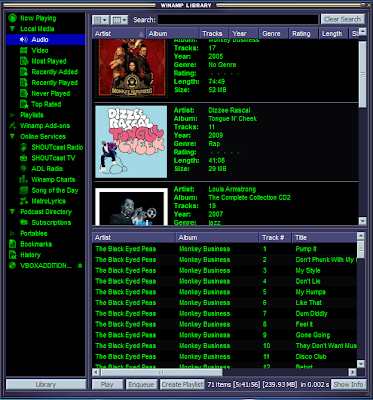
Sometimes the journey is more interesting than the destination

I'm not sure why Winamp won't import album art from iTunes, and I don't know why when it can look up some of my albums it can't find other equally mainstream releases. What I did find out was how bliss helps you move your iTunes library to other players. Now, back to listening to the music...

Tuesday, 27 October 2009

Automatic album art management with bliss

bliss is almost ready for release. Our intrepid beta testers and I have been throwing it all at bliss over the past few weeks. We've found some bugs and also the time to add some extra features.

I thought it was a good time to show you how bliss manages album art for my music collection

I want my music collection to contain album art. I want it all embedded in the music files, and I want it all saved in a file prefixed 'cover' (this is a Squeezebox thing). I don't care about the size of the art, but I'd rather have something.

All these requirements are defined in bliss's cover art 'rule'. Here's how it looks:
Now I click 'Apply', and away goes bliss! bliss finds existing art in the library and makes sure it is embedded. Sometimes there is no art, but it finds it automatically (by downloading it from the Web) and then embeds it...


Some it isn't sure about, because either the tag doesn't describe the album properly or it's a rare recording, so bliss asks me...

And it's done! That took a fraction of the time it used to take. No searching through Google or Amazon. No using a tag editor to embed the image I found in each file.

The best bit? If I change how I want my album art stored I just change the rule and let bliss do all the work!

Reminds me of a song...